Andrew Dorokhov

Payments · Singapore payment provider

A WooCommerce payment gateway that signs customers up once and charges every renewal on its own

A WordPress plugin that connects WooCommerce and WooCommerce Subscriptions to a payment provider's API: one-off payments, subscriptions on a card saved by the provider, automatic renewals, signed webhooks and refunds from the order screen.

payment methods at checkout
7
subscription operations supported
7
card numbers stored by the shop
0

The challenge

What the client needed

The client is a payment provider in Singapore. Its merchants run WooCommerce stores and accept cards, PayNow QR, Apple Pay, Google Pay, WeChat Pay, Alipay and GrabPay through it.

WooCommerce Subscriptions can manage the plans, but it needs a gateway that can charge a customer who isn't there. Every renewal has to go through without the customer typing card details again, and the shop must never see those details.

The provider had a recurring billing API and needed a plugin that tied it to WooCommerce: checkout, first payment, scheduled renewals, webhooks and refunds, plus the admin controls merchants expect.

The approach

How I solved it

01

One gateway, two payment paths

The plugin adds a gateway built on WC_Payment_Gateway. At checkout it looks at the cart: a regular order becomes a payment request, and an order with a subscription becomes a recurring billing with save_card turned on. In both cases the customer pays on the provider's page, so card data never reaches the shop.
02

Card saved once, charged on schedule

The provider returns a recurring billing ID, and the plugin stores it on the subscription instead of the order. Every renewal order WooCommerce Subscriptions creates can then find it: on the scheduled payment hook the plugin calls the charge endpoint for that ID and the amount due, and marks the renewal as paid.

03

First payment on the way back

When the customer returns to the thank-you page with an active billing, the plugin checks the order key and charges the first payment straight away. A later fix made this step work with SEO-friendly permalinks as well as plain query-string URLs.

04

Webhooks nobody can fake

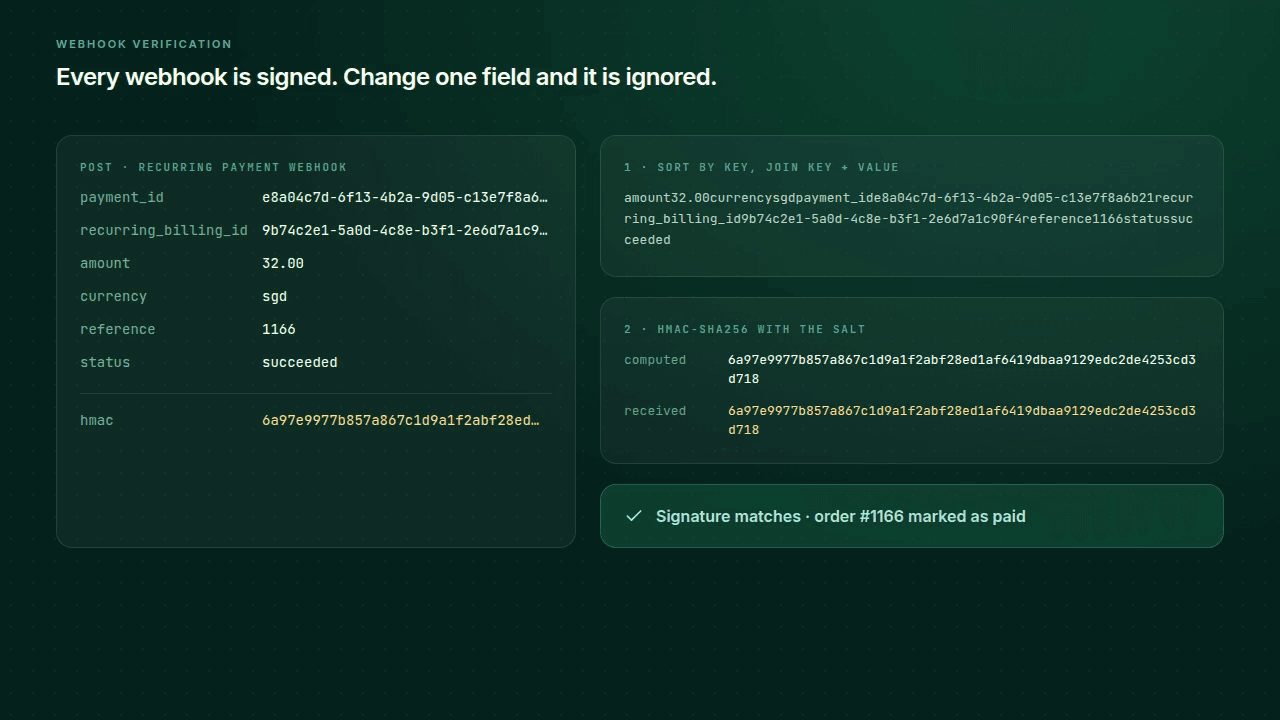
Two webhook endpoints, one for regular payments and one for recurring ones, sit on WooCommerce's own API. Each request must carry every expected field and an HMAC-SHA256 signature over the sorted fields, keyed with the merchant's salt. An order that no longer needs payment is skipped, so a repeated webhook can't complete it twice.

05

Refunds from the order screen

WooCommerce's Refund button goes straight to the provider's refund API with the payment ID saved on the order. Full and partial refunds work the same way, and the refund reference ID and amount land in the order notes.

06

Settings for merchants

Sandbox and live keys with validation, payment logos chosen from a list, the order status to set after payment, and an optional payment-link expiry of 5 to 1,000 minutes. The plugin list gets a direct Settings link. Development ran in Docker with a tunnel, so the provider's webhooks could reach a local WordPress.

In motion

Highlights

01

From sign-up to renewal

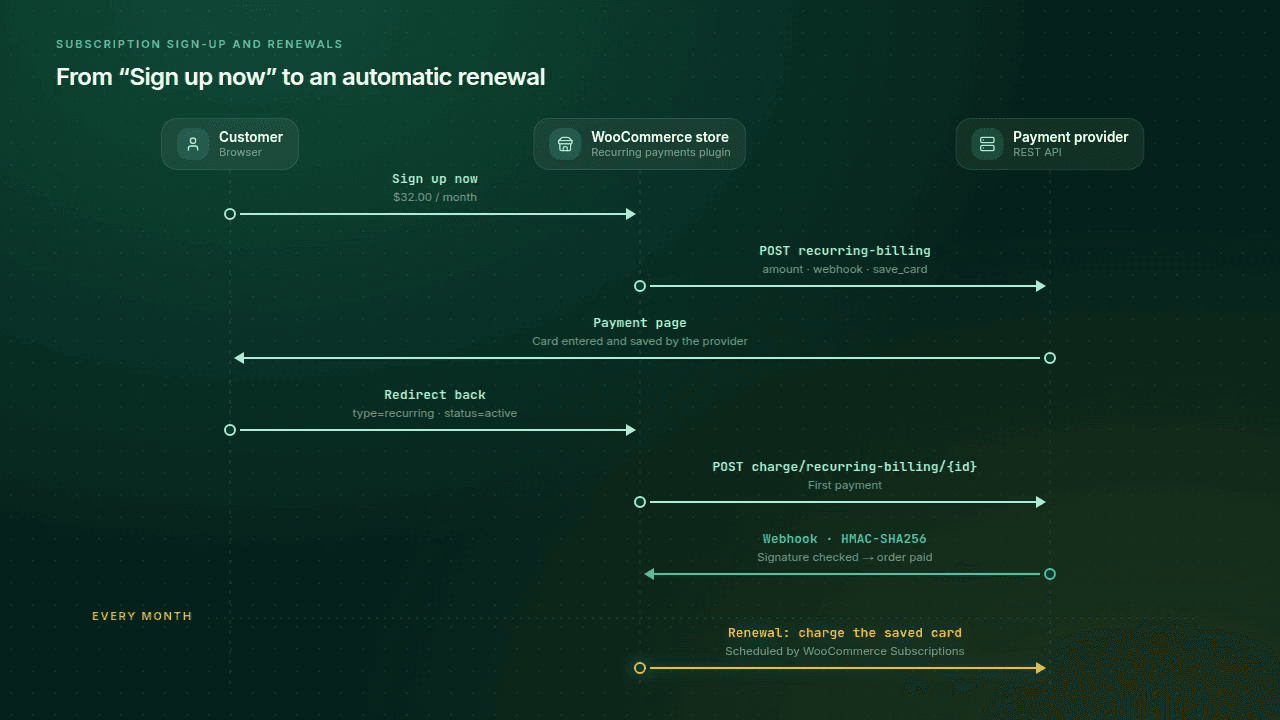
The customer signs up, pays on the provider's page and comes back. The plugin charges the first payment, a signed webhook confirms it, and each month the scheduler charges the saved card again.

Sequence diagram between customer, WooCommerce store and payment provider: sign-up, recurring billing request, payment page, redirect back, first charge, signed webhook, then a monthly renewal charge.
02

Renewals that run themselves

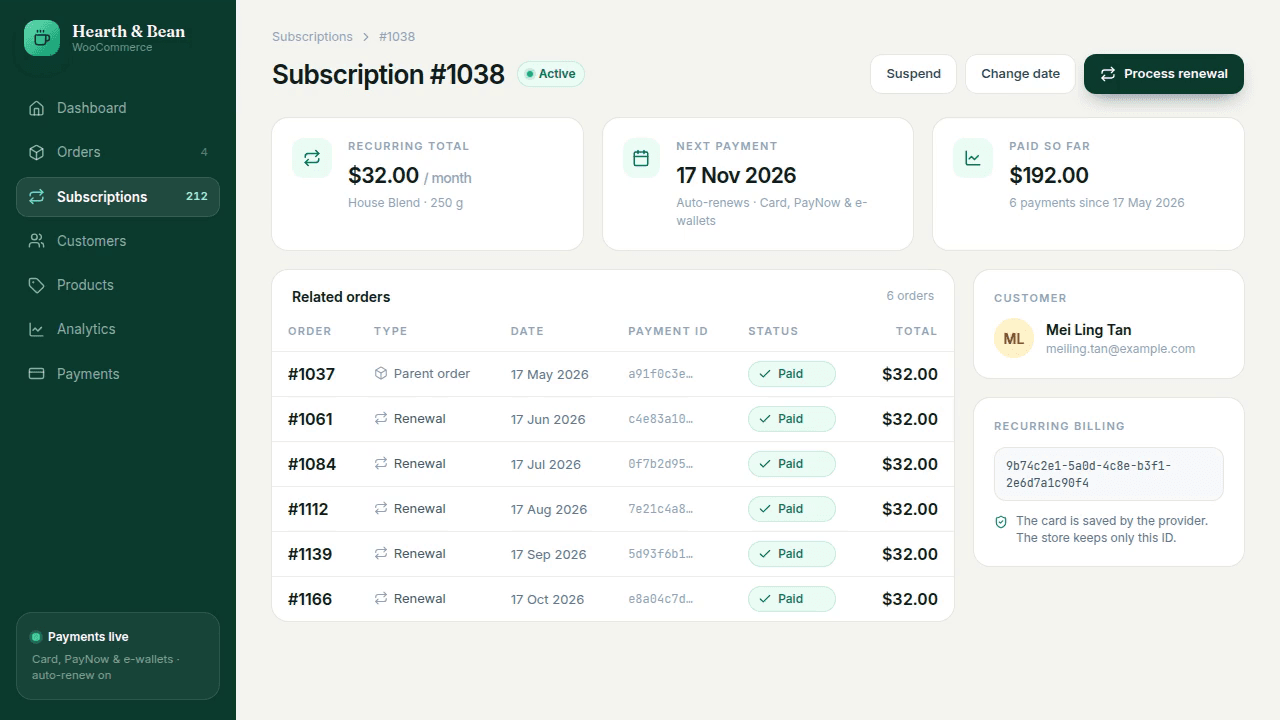
Each month a renewal order appears, the saved card is charged and the order turns paid. The total paid and the next payment date move on by themselves.

Subscription page: renewal orders are added one by one, show 'Charging…' and then 'Paid', while 'Paid so far' grows and the next payment date moves forward.
03

A signature on every webhook

The plugin sorts the fields, joins them and computes HMAC-SHA256 with the salt. A genuine webhook matches and the order is paid; the same webhook with a changed amount doesn't, and it is ignored.

A webhook's fields are sorted and joined, the HMAC is computed and matches the received one, so the order is marked paid; then the amount is changed, the HMAC differs and the webhook is ignored.

See it in action

The product

Checkout: the plan, the recurring total and the payment method with its logos.
A subscription with its renewals, each charged automatically.
Gateway settings: keys, mode, logos, order status and link expiry.
A partial refund from the order screen, recorded in the notes.

The outcome

What the client got

  • Merchants sell subscriptions in WooCommerce and get paid on every renewal without the customer coming back.
  • Customers enter their card once, on the provider's page; the shop keeps only an ID.
  • Store owners can suspend, reactivate and cancel subscriptions, change their amount or date, and sell several at once.
  • A webhook with a changed field is ignored, and a repeated one doesn't mark an order as paid twice.
  • Full and partial refunds take one click on the order screen and leave a trace in the notes.
  • The plugin shipped in two releases with an installation and setup guide for merchants.

Need something similar built?

Send a short brief about your project. Within 24 hours you get an estimate or a clear next step, even if we don't work together.